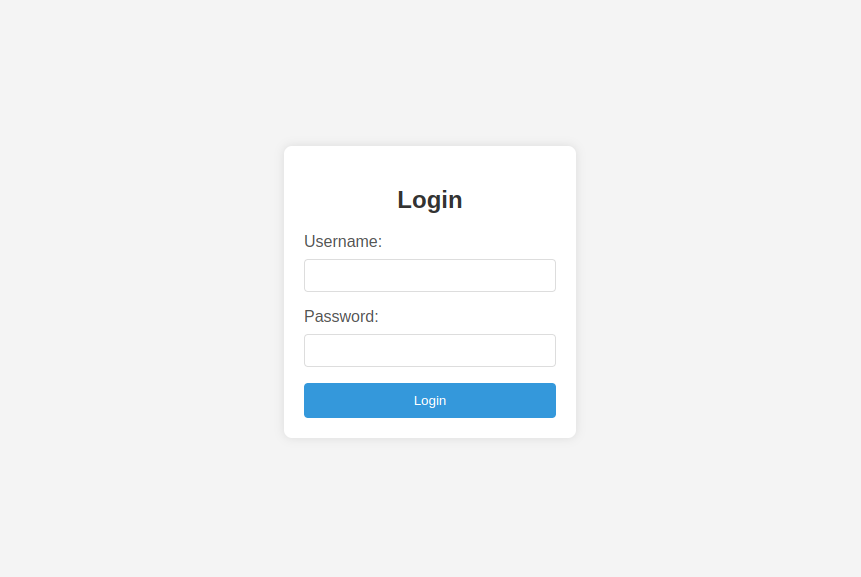
This blog will explain your can create login form template in just 2 minutes with simple html and css and that can be used in any web or mobile application as well
HTML (index.html):
<!DOCTYPE html>
<html lang="en">
<head>
  <meta charset="UTF-8">
  <meta name="viewport" content="width=device-width, initial-scale=1.0">
  <link rel="stylesheet" href="styles.css">
  <title>Login Form</title>
</head>
<body>
  <div class="container">
    <form class="login-form">
      <h2>Login</h2>
      <label for="username">Username:</label>
      <input type="text" id="username" name="username" required>

      <label for="password">Password:</label>
      <input type="password" id="password" name="password" required>

      <button type="submit">Login</button>
    </form>
  </div>
</body>
</html>
CSS (styles.css):
body {
  font-family: Arial, sans-serif;
  margin: 0;
  display: flex;
  justify-content: center;
  align-items: center;
  height: 100vh;
  background-color: #f4f4f4;
}

.container {
  background-color: #fff;
  padding: 20px;
  border-radius: 8px;
  box-shadow: 0 0 10px rgba(0, 0, 0, 0.1);
}

.login-form {
  max-width: 300px;
  margin: 0 auto;
}

h2 {
  text-align: center;
  color: #333;
}

label {
  display: block;
  margin-bottom: 8px;
  color: #555;
}

input {
  width: 100%;
  padding: 8px;
  margin-bottom: 16px;
  border: 1px solid #ddd;
  border-radius: 4px;
  box-sizing: border-box;
}

button {
  width: 100%;
  padding: 10px;
  background-color: #3498db;
  color: #fff;
  border: none;
  border-radius: 4px;
  cursor: pointer;
}

button:hover {
  background-color: #2980b9;
}
Certainly! When designing a user interface (UI) and user experience (UX) with code, you’ll typically work with HTML, CSS, and possibly JavaScript for more interactive elements. Below is a simple example of a login form with HTML and CSS: